


From your Ricoh GR IV to Lightroom.
A USB-C connection helper that prepares Ricoh GR IV storage for Lightroom import on supported iPhones and iPads.
Preparing for App Store releaseVisit Bridge for Ricoh GR
Prepare the connection, then hand over to Lightroom.
With the Ricoh GR IV in playback mode, open Bridge before connecting the data cable. The app opens a read-only session, checks the camera’s internal memory and SD card, then releases the session. Once the camera-ready signal appears, open Lightroom and select the photographs there for import.
A focused utility for a specific setup.
The documented setup is a Ricoh GR IV, a USB-C iPhone or iPad running iOS or iPadOS 26 or later, a data-capable cable and Lightroom. Bridge counts originals and prepares the handover; importing remains in Lightroom. Version 1.0 is preparing for App Store release, with current availability published on the product website.
A closer look
The connection workflow.
The public setup guide for Bridge for Ricoh GR.
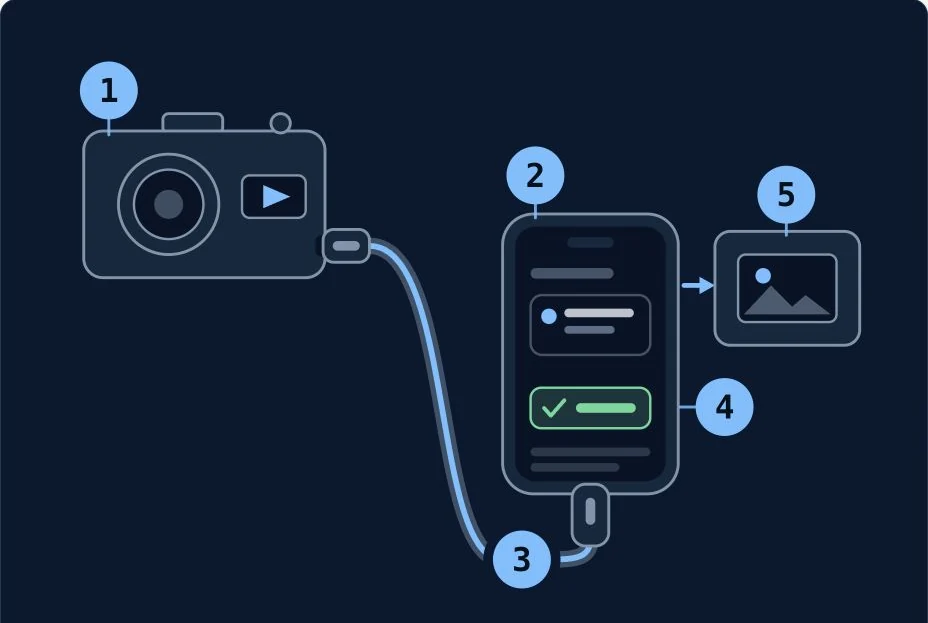
Connect, prepare, then import
Camera playback, Bridge waiting, data cable, ready signal — then import in Lightroom.
Explore on Bridge for Ricoh GR ↗